
Last Modified: 26 Oct 2026
Reading time: 4m
Word Count: 755
Created On: 26 Oct 2026
Screen Problems
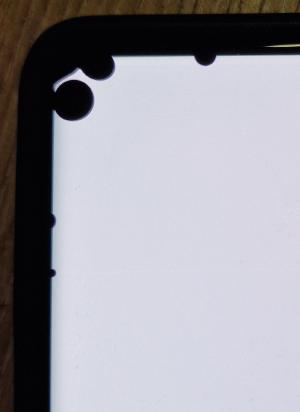
So after holding off on repairing my still “functional” phone1 I finally succumb to the repair gods after ominous black splodges started expanding from the top left corner of my screen. Experiencing the night light struggling to turn off for a minute after switching on the phone only enhanced my motivation to at least fix this screen issue, as personal experience dictates that a working display is a fairly highly vital for daily use of a mobile phone. The accelerometer, torch, and speaker being broken I can live with.
Repair
After purchase of a replacement screen2 (of questionable quality) and recruiting a friend for moral support alongside borrowing her tools I was ready to start.
Removing Screen
There are three important parts to removing a phone screen:
- Heat: To soften the adhesive bonding the screen to the phone
- Suction cup: To slightly lift the screen off
- Thin piece of plastic: To pry the screen off via the slight gap
This process was made easier by virtue of having already taken off the screen once before and not needing the original screen to work, which turned out to be quite handy as I accidentally levered some of the screen apart rather than off of the phone!
After several rounds of heating and prying the display finally came off and I got access to the guts of my phone. Having a poke around the broken screen me and my friend found corrosion in the top left corner, which is the likely cause of the ominous black spots.
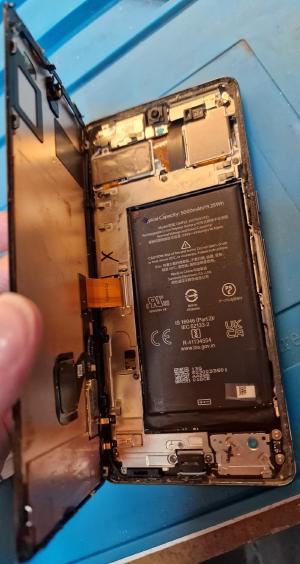
I would not recommend using a phone like this but there is nothing stopping you.
Removing Adhesive
After testing that the new screen did in fact work, the (tedious) task of removing old adhesive began, so I could put in new adhesive for the new screen. A process that mildly tested my sanity, not helped by the technician (who fixed the last broken screen) seemingly not getting around to the removal of old adhesive phase.
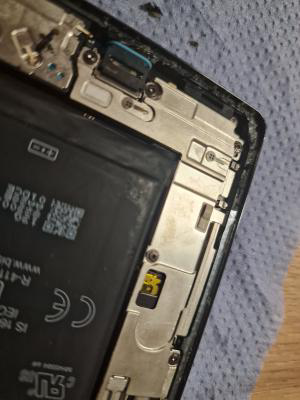
This was by far the longest part of the repair as the adhesive was very degraded, needing to be scraped off instead of peeled. Some lovely comments made by me during the process are “dkhgfsuifhusegfisdhf” and “It gets no better after an hour”.
Applying Adhesive
This is simple, in theory. Applying adhesive glue or strips around the perimeter of a phone to attach the screen.
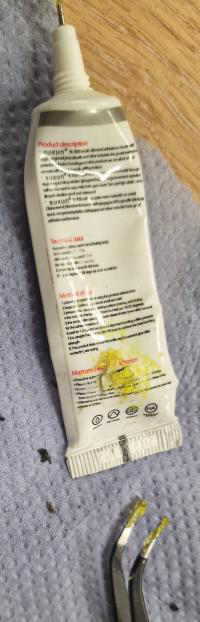
Application of adhesive was complicated by my friend supplying outdated glue. The main symptom of “outdatedness” was the viscosity of the glue being comparable to a block of wood. Diligent observers may note that a human cannot shape a block of wood with their fingers. What followed was the best worst idea of the process as the words “Where’s the vice” left my mouth and I began searching for a G-clamp3.
Initially this worked okay, I was able to somewhat extract glue from the intended orifice. It was when I loosened the G-clamp that my folly came to light. There was now a second hold in the glue tube. Unexpectedly, this lead to the most efficient method of glue extraction. Squeezing out droplets and placing them with tweezers on the phone.
Securing Screen
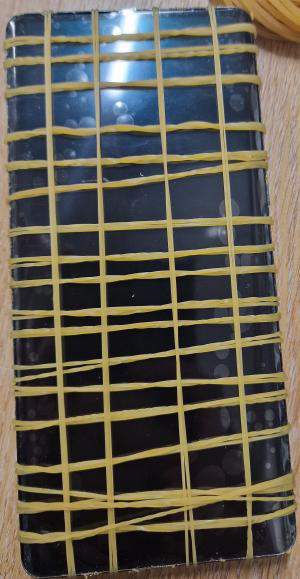
To ensure the screen and the phone remain in matrimony, pressure is required for the first few hours. A bag full of elastic bands was perfectly able to provide such support in the form of phone Shibari4, during which my phone was amusingly somewhat usable.
Closing Remarks
The experience was one I would call interesting rather than enjoyable, mostly due to the old adhesive and lack of functioning glue. Sans those elements this is something I would recommend to anyone who does not mind tinkering. After all, I did get a working phone in the end.
Regarding the replacement phone screen, I would describe it as adequate. With large bezels (perhaps due to not having any pixels behind the curved glass?) and an imperfection in the middle left of the screen. Furthermore, the night light looks outright bad compared to my memory of the stock screen. It works, but if I were to do it again I would look elsewhere for a screen.
I performed this repair in my local hackspace5, which helped immensely with tools for heating and finding competent people to help me with the process.
-
A Google Pixel Pro 7 (yay GrapheneOS) ↩︎
-
Acquired from Ebay via SupremePhoneParts. See opinions in Closing Remarks ↩︎
-
I know they are not they same, I fumbled my words ↩︎
-
The art of tying ropes/twine ↩︎
-
Also known as makerspace? ↩︎